
FOX LOCAL: Live News & Weather
Fox Television Stations, Inc.News & Magazines
4.41.34K Reviews
- Version
- Varies With Device
- Installs
- 1.00M
- Age Rating
- Everyone
Screenshots




Our Review of FOX LOCAL: Live News & Weather
 Analysis by Appyee
My day usually begins with a quick question: is anything happening nearby that could change my plans? I might be deciding whether to leave early, checking on a developing local story, or simply trying to understand the weather before heading out. FOX LOCAL: Live News & Weather brings those two kinds of information together, which makes it useful when I want a local check-in without turning on a television. I find it most valuable as a convenient starting point, rather than a replacement for every news source I use.
A useful first stop for local updates
FOX LOCAL is a free news and magazines app from Fox Television Stations, Inc. It has a 4.5 average from around 7,500 ratings, and more than 500,000 installs. The app is rated for Everyone, and its release on April 21, 2023 makes it a relatively recent addition to the local-news app mix. Those figures give a sense of its reach, but what matters in daily use is whether its local focus fits your routine.
For me, the clearest use case is a short morning check: open the app, look for a local headline that affects the day, then check the forecast before leaving. If a storm or developing story is relevant, I can spend more time with the coverage or turn on alerts that suit me. That simple sequence is more practical than opening a broad national news app and searching through unrelated headlines for something nearby.
Getting Started with FOX LOCAL: Live News & Weather
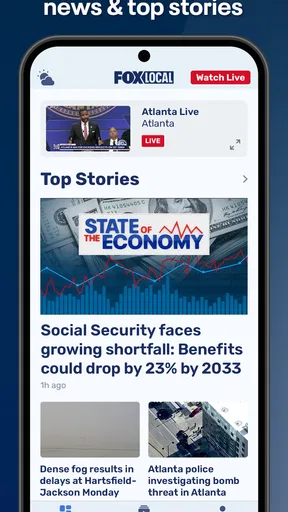
First things first, downloading the app was a breeze. It’s available for both Android and iOS, so no worries about compatibility. Once you open it, you're greeted with a clean, user-friendly interface that's easy to navigate. The app lets you choose your local area right from the start, which is super handy if you want to dive straight into what matters to you.
Choosing a location with care
That opening location choice is more than a setup chore: it shapes whether the app feels immediately relevant. I’d select the area where I spend most of my time, then consider whether another nearby place matters to my regular trips. Someone who commutes across a city boundary may care about conditions at both ends of the journey, while a person who mostly stays in one neighborhood may prefer a tighter local focus.
If you move, travel, or split your week between home and work, it is worth checking that the selected area still matches the question you are asking. A local forecast can be useful but misleading for a destination farther away, and a headline tied to one community may not describe what is happening elsewhere. I treat the chosen location as the app’s starting lens, not as proof that every nearby place has identical conditions.
From headline to a practical plan
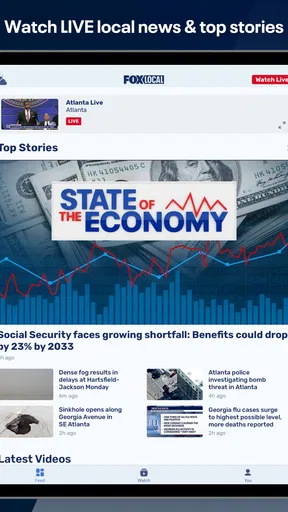
The main menu offers a variety of sections: news, weather, sports, and even live streaming. The live news feature is definitely a highlight. It gives you access to broadcasts from your local FOX station, so you can catch up on the latest happenings anytime, anywhere.
A useful way to move through those sections is to begin with the reason you opened the app. If I have only a minute, I scan local headlines and check the forecast; if a story is developing, I can move from its written coverage to a live broadcast or video when that format is more helpful. The handoff from reading to watching is a real convenience, although a stream is less suited to a quick glance than a headline or forecast.
For example, before leaving for an outdoor appointment, I might check the local forecast, look at the radar for a visual sense of approaching weather, and then decide whether to bring a jacket or adjust my departure. If local coverage is reporting a disruption, I can look for more context rather than relying on a brief notification. The app helps gather those checks in one place; I still use judgment when the decision has safety or travel consequences.
Weather is most useful when checked in context
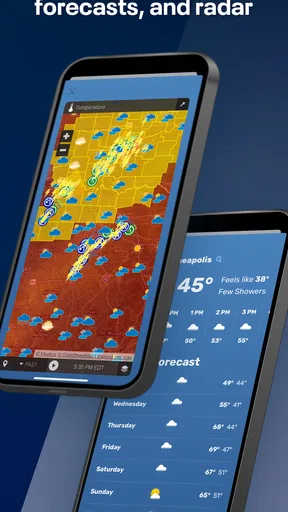
As for the weather updates, they are spot-on. The app provides detailed forecasts, including hourly and weekly predictions. There’s also a nifty radar map that gives you a visual of weather patterns in your area.
I find the combination more useful than treating any single forecast view as a complete answer. The hourly outlook can help with a same-day plan, while the weekly view is better for rough scheduling; the radar offers a visual snapshot that can help me decide whether to check again before leaving. These views answer different questions, so I would not use a week-ahead forecast as a precise promise about a particular hour.
There is also a practical trade-off here: weather changes, and a map or forecast is only useful if I look at it when the decision is being made. For a quick routine, I check the relevant time window rather than browsing every forecast panel. If conditions are severe or travel is especially sensitive, I would cross-check with an authoritative local source instead of depending on one app alone.
Local reporting alongside broader news
One thing I absolutely adore about this app is the quality of the content. The news articles are well-written and updated frequently. You can tell there's a focus on delivering timely and accurate information. Plus, the video quality is top-notch, making it pleasant to watch the live streams and video clips.
Its strongest distinction is the local-station perspective. A national news app is usually better when I want a broad overview of events across the country or the world; a general weather app may be faster for a glance at conditions without any news. FOX LOCAL makes more sense when I want local reporting and weather together, especially if I value the broadcast format as well as written stories.
That focus is also a limit, not a flaw. Readers who want a wide range of independent outlets, deep specialist coverage, or a single national feed may find a general news aggregator more suitable. I would use FOX LOCAL to understand what its local station is covering, then consult other reporting when a story calls for more perspectives or detailed background.
Alerts without letting the phone take over
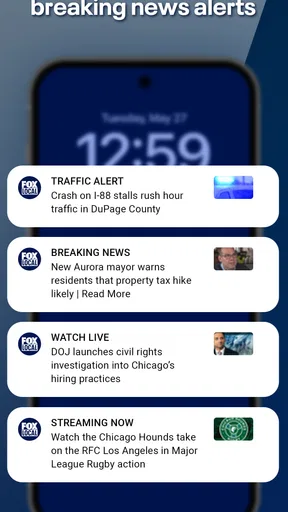
An awesome feature that deserves a mention is the customization options. You can tailor the app to send you push notifications for specific topics, like breaking news or weather alerts. It's a great way to stay informed without being bombarded by information you don't need.
Setting up these alerts is straightforward. Just dive into the settings, toggle the switches for the alerts you want, and you're good to go. It's that easy!
My practical tip is to start with only the alerts that would change what you do: a relevant weather warning or a major local development, for instance. A notification is most helpful when it gives me a reason to open the app; if every topic is enabled, the phone can become another stream of interruptions. I’d review the choices after using the app for a while and switch off anything that no longer earns its place.
Alerts are a prompt to investigate, not a substitute for checking the details. If one arrives while I am busy, I can decide whether it needs immediate attention or whether I can read the full story later. That small distinction makes notifications more useful and helps keep a local news app from dictating the rhythm of the day.
When the app fits—and when it doesn’t
FOX LOCAL is a good fit for someone who wants a straightforward local routine: headlines, weather, and the option to watch coverage from a local FOX station. It can also suit people who prefer to hear a report rather than read a longer article, or who want a single place to check before commuting, walking the dog, or making plans outside.
I would be less likely to recommend it as a person’s only news source. If you need a broad selection of viewpoints, international coverage, or highly specialized reporting, a general news service or several trusted publishers will serve you better. Likewise, if all you want is a compact forecast widget and nothing about local news, a dedicated weather app may be a quicker fit.
It is free to use, which lowers the barrier to trying it, but the experience still involves advertising. The ads did not feel intrusive in my use, though anyone who expects an uninterrupted reading or viewing session should factor them in. Video also asks for more time and attention than a short text update, so I save live coverage for moments when I can actually watch or listen.
How it behaves in an ordinary day
Imagine I am getting ready to leave home and rain is possible later. I open the app, check the hourly forecast and radar, then scan the local news in case a nearby development affects my route. If nothing needs follow-up, I close it and get on with the day. If a story matters, I can read more or switch to live coverage; if a weather alert is relevant, I can use it as a cue to check conditions again before heading out.
The useful outcome is not that the app makes every decision for me. It reduces the number of separate places I need to visit for a first local check. I still have to judge whether a headline applies to my plans, whether a forecast is current enough for the decision, and whether a major story deserves confirmation from another source. That is a sensible role for a local news app: help me notice what may matter, then let me follow through.
Performance and Usability
In terms of performance, the app runs smoothly. I didn’t experience any lag or crashes, which is always a relief. The layout is intuitive, and everything is right where you’d expect it to be. Even the ads, which are present, aren’t intrusive. They’re placed in a way that doesn’t disrupt the user experience.
That smoothness matters most when I am checking something quickly, but it does not remove the ordinary friction of switching from a glance to a longer story or stream. A live broadcast is a different commitment from reading a headline, and viewing it is best when I have a stable connection and a moment to pay attention. When I am in a hurry, I stick to text and weather; when I have time, the video option gives the local coverage another useful format.
My bottom line
Overall, FOX LOCAL: Live News & Weather is a solid app for anyone looking to stay updated on local news and weather. It's reliable, easy to use, and packed with features that make it a valuable tool for staying informed. Whether you're a news junkie or just someone who likes to keep tabs on the weather before heading out, this app has got you covered.
If you're still on the fence about downloading it, I'd say give it a shot. It's free, after all, and you might find it becomes your go-to app for news and weather updates. Happy browsing!
Privacy and Permissions
See what permissions an app requests and how it handles your data.
- Photos/Media/Files
- read the contents of your USB storage, modify or delete the contents of your USB storage
- Storage
- read the contents of your USB storage, modify or delete the contents of your USB storage
- Wi-Fi connection information
- view Wi-Fi connections
- Other
- view network connections, allow Wi-Fi Multicast reception, full network access, run at startup, draw over other apps, control vibration, prevent device from sleeping
Verdict
Strengths of FOX LOCAL: Live News & Weather
- User-friendly interface for quick navigation.
- Real-time alerts for breaking news updates.
- Customizable news feed based on preferences.
- Comprehensive weather forecasts with radar.
- Local news coverage tailored to your area.
Limitations of FOX LOCAL: Live News & Weather
- Limited international news coverage.
- Occasional ads may interrupt reading.
- Requires stable internet for smooth use.
- Some features locked behind a paywall.
- Push notifications can be overwhelming.
Other Releases by Fox Television Stations, Inc.
View All
FOX 4: DFW WAPP - Weather
Weather3.8

FOX 13 Tampa: SkyTower Weather
Weather3.9
Similar Picks in This Category
View All
Google News - Daily Headlines
Google LLC4.0

X
X Corp.4.8

Flipboard:Your Social Magazine
Flipboard3.4

Opera News: breaking & local
Opera4.5

Hindi News by Dainik Bhaskar
Dainik Bhaskar Group4.0

Way2News Daily News App
Way2News ( Formerly Way2SMS )4.6
Frequently Asked Questions
What features does FOX LOCAL: Live News & Weather offer?
FOX LOCAL: Live News & Weather provides users with up-to-date news coverage and weather forecasts. It aggregates local news, live broadcasts, and weather updates from trusted FOX affiliates. Users can customize notifications for breaking news and severe weather alerts, ensuring they stay informed about events in their area.
Is the app free to use or are there any in-app purchases?
FOX LOCAL: Live News & Weather is free to download and use. However, some features may require a subscription or one-time purchase to access premium content or to remove ads. It's advisable to check the app description in the store for detailed information on potential in-app purchases.
How does the app ensure the accuracy of its news and weather forecasts?
The app sources its content from FOX affiliates, which are known for their rigorous journalistic standards. Weather forecasts are provided by professional meteorologists, using reliable data and predictive models. While no forecast is infallible, the app strives to provide the most accurate information possible.
Can I customize the notifications I receive from the app?
Yes, you can customize notifications in FOX LOCAL: Live News & Weather. Users can select specific alerts for breaking news, sports updates, or severe weather warnings. This customization ensures you only receive notifications that are relevant and important to you, reducing unnecessary interruptions.
Does the app require a constant internet connection to work effectively?
While FOX LOCAL: Live News & Weather does require an internet connection to stream live broadcasts and update news content, some features may be available offline. For instance, previously downloaded articles or cached weather forecasts might be accessible without an internet connection. However, for real-time updates, connectivity is essential.
